

Log into your WWS dashboard with your registered email address.
Navigate to Business Emails Section by your lefthand side
Click on the particular email service you wish to set up.
First, you will see a requirement to verify the ownership of the domain.
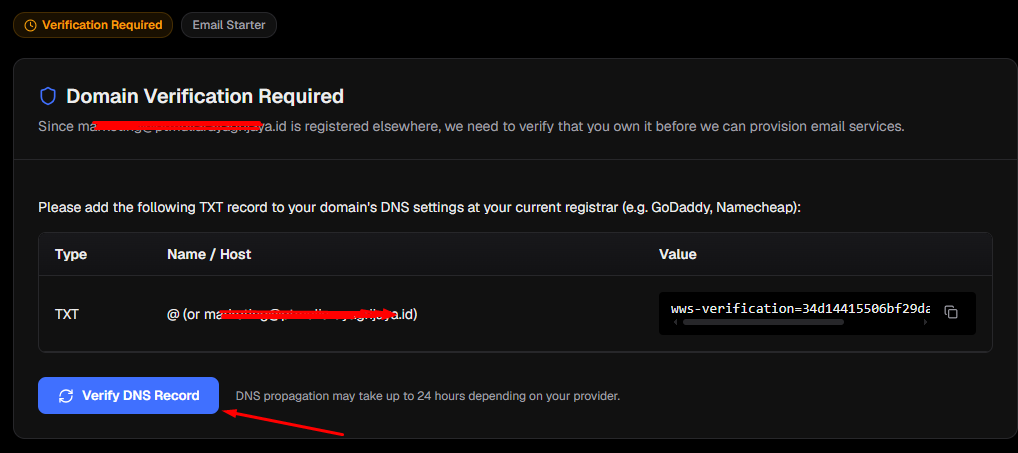
Verify the domain name by copying the TXT record and adding to the DNS zone of your host provider.
If you have just a domain name without a host, then add the records in the dns manager of your domain provider. If your domain is registered with WWS, then you need to add the records in your DNS area provided for the domain in your WWS dashboard.
Once the TXT records are added and the verification of domain ownership is done, the "verification required notification" will be cleared out and you can proceed to add the relevant DNS records displayed on your dashboard such as A, MX, TXT, DKIM and DMARC.
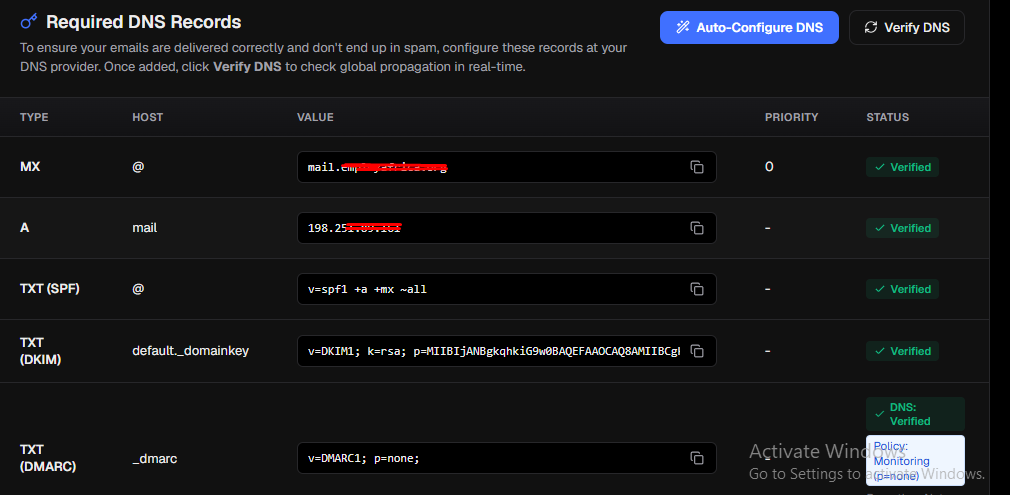
Your mail should begin to flow once all records are propagated.