

How to Place an Order for a Domain Name and Hosting
If you want to create a website, you will need two important things: a domain name (your website address, such as mybusiness.com) and web hosting (the space where your website files are kept).
Follow the simple steps below to place your order:
Step 1: Visit the Website
Open your internet browser, such as Google Chrome, Microsoft Edge, or Firefox.
In the address bar at the top of the browser, type:
This will take you to the website.
Step 2: Go to the Web Hosting Section
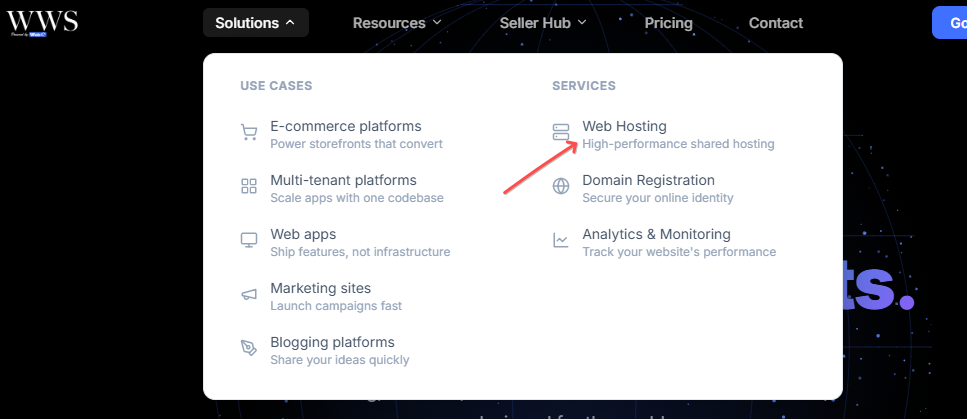
Once the website opens, look at the top of the page for "Solutions."
Click on "Solutions." A small menu will appear with different options.
From the menu, click on "Web Hosting."
You will then be taken to the Web Hosting page, where you can see the different hosting plans available.

Step 3: Choose a Hosting Plan
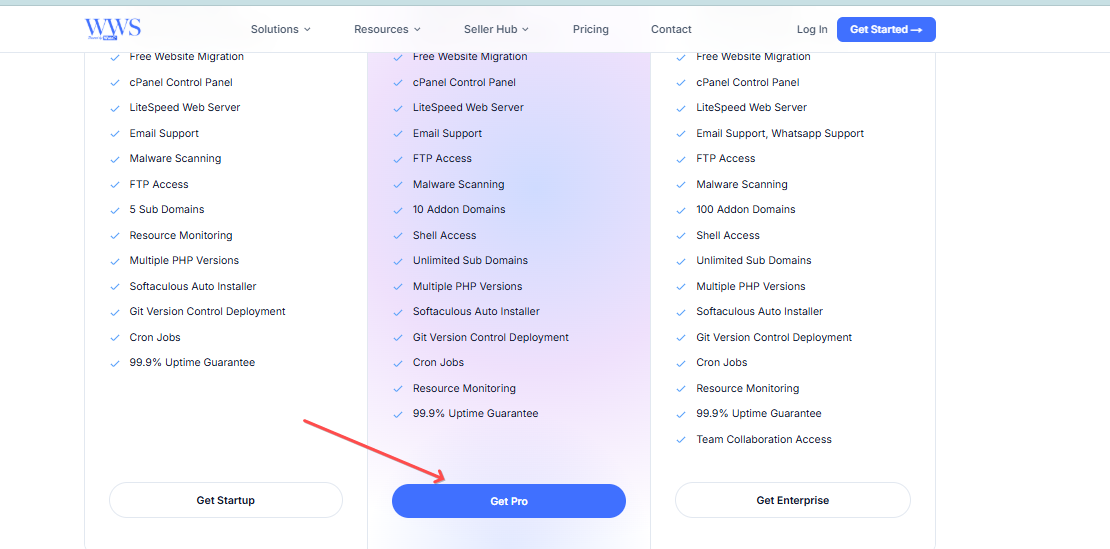
Take a look at the different hosting plans on the page.
Each plan may have different features, storage space, prices, and benefits.
Choose the plan that best suits your needs.
Once you have decided which plan you want, click on the "Order Now," "Buy Now," or similar button displayed under the plan.
You will then be taken to the next page where you can provide your details and continue with your order.
Step 4: Choose What You Want to Do With Your Domain
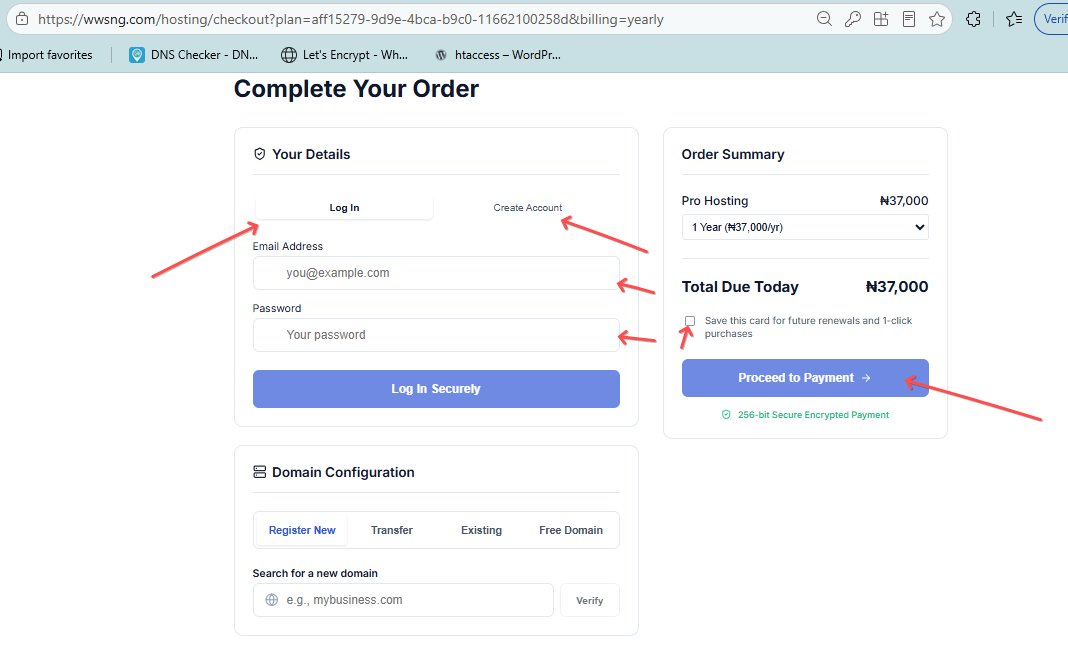
At this stage, you will be asked about your domain name.
A domain name is simply the address people will type into their browser to visit your website. For example:
mybusiness.com
You will usually see options that allow you to choose what you want to do with your domain.
You can:
Use an existing domain name – Choose this if you already have a domain name and want to use it with your new hosting account.
Register a new domain name – Choose this if you do not have a domain name yet and want to register a new one.
Transfer in a domain name – Choose this if you already have a domain registered with another company and want to move it to your new provider.
Select the option that applies to you and follow the instructions provided on the page.
Step 5: Enter Your Details
After selecting your domain option, you will be asked to provide some personal or account information.
Carefully enter the requested details, such as your:
Full name
Email address
Phone number
Address
Other information requested on the page
Make sure the information you enter is correct, especially your email address and phone number, because they may be used to send you important information about your order and account.
Step 6: Review Your Order
Before making payment, take a moment to check your order carefully.
Make sure you have selected the correct hosting plan and that the domain name you want is correct.
Also check the total amount you are expected to pay.
If everything looks correct, proceed to the payment section.
Step 7: Make Your Payment
Choose your preferred payment option and enter the required payment details.
If you are paying with a debit or credit card, enter your card details as requested.
After entering the necessary information, click on the "Proceed to Payment" button
Step 8: Confirm Your Order
Once your payment has been successfully completed, you should receive a confirmation message on the website and/or an email confirming your order.
Check your email for your order confirmation and other important information about your domain and hosting account.
That's it! Your order has been placed successfully
If you experience any difficulty while placing the order, you can contact the support team for assistance.